
Drawquarium Wiki: Guides, Fish List and Game Systems
A working Drawquarium wiki for launch week: what the game is, how its systems connect, and which guide to read first.
Drawquarium is a cozy aquarium sandbox for Windows in which you draw fish, raise them in a tank, and can turn that tank into an animated desktop wallpaper. It releases on Steam on November 13, 2026, from developer byKaleb and publisher rokaplay. The store page describes six pillars: drawing fish companions, drawing plants and decor, wallpaper mode, tank customization, focus tools, and importing your own images. This wiki maps those pillars to the guides on this site and separates what is confirmed from what is still unknown.
For a route through the first week, read the Drawquarium guide→.
The short version
- Release: November 13, 2026, on Steam for Windows.
- Demo: a separate free demo (app 4331760) has been available since April 18, 2026.
- Price: not listed at the time of writing, and the game is not marked free.
- Core loop: draw a fish, feed it, keep the tank clean, earn Golden Scales, unlock templates and tank parts, repeat with better fish.
- The hook: the same tank can run as your desktop wallpaper, with the game minimized to the tray.
- No combat, no fail state: the pressure comes from hunger, dirty water from leftover food, and your own goals.
What you actually do in a session
A normal session has three layers. The first is maintenance: check the fish cards, feed anyone whose hunger ring is low, and vacuum leftover food before it turns into muck. The second is creation: draw a new fish or plant, or rework an old drawing in the editor. The third is progression: finish the goals in the task list, collect Golden Scales that appear in the tank, and spend them on locked templates, brushes, or tank parts.
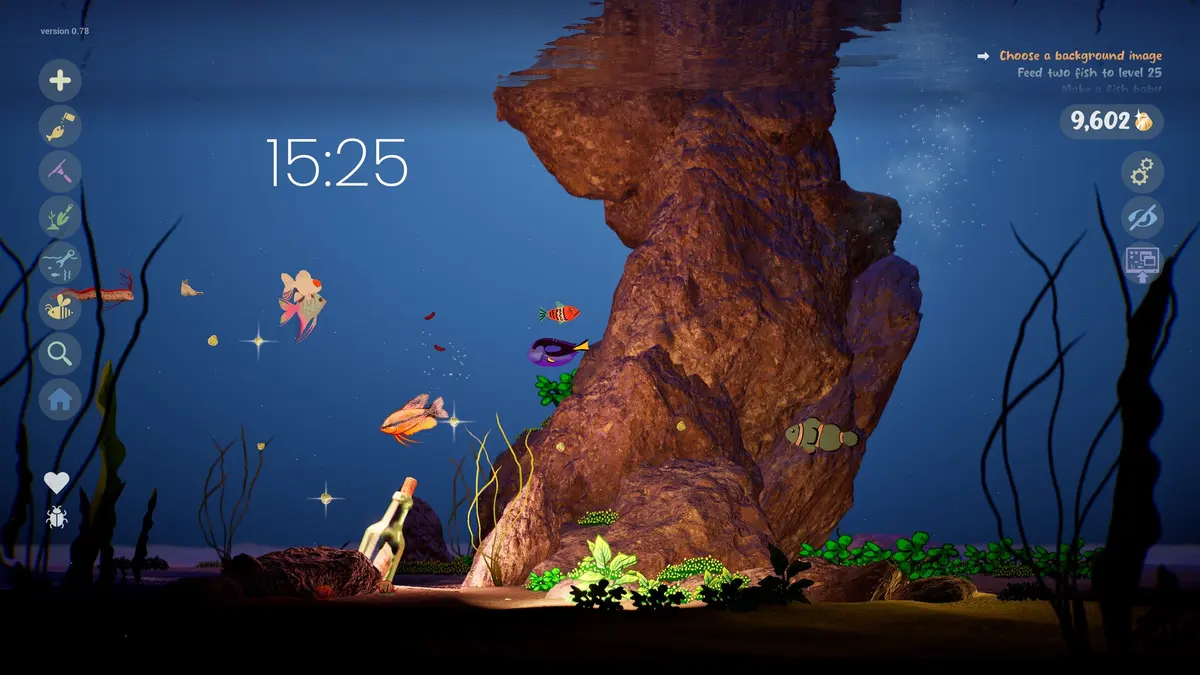
The official screenshots show a left-side icon rail for adding things, feeding, tools, plants, substrate, the fish list, home, relationships, and worms. The same screens show a Golden Scale counter in the top right, a goals panel, a large clock, and buttons for settings, hiding the interface, and wallpaper mode. That layout matters because it tells you where the game expects you to spend attention: the tank is the menu.
Confirmed systems, in plain language
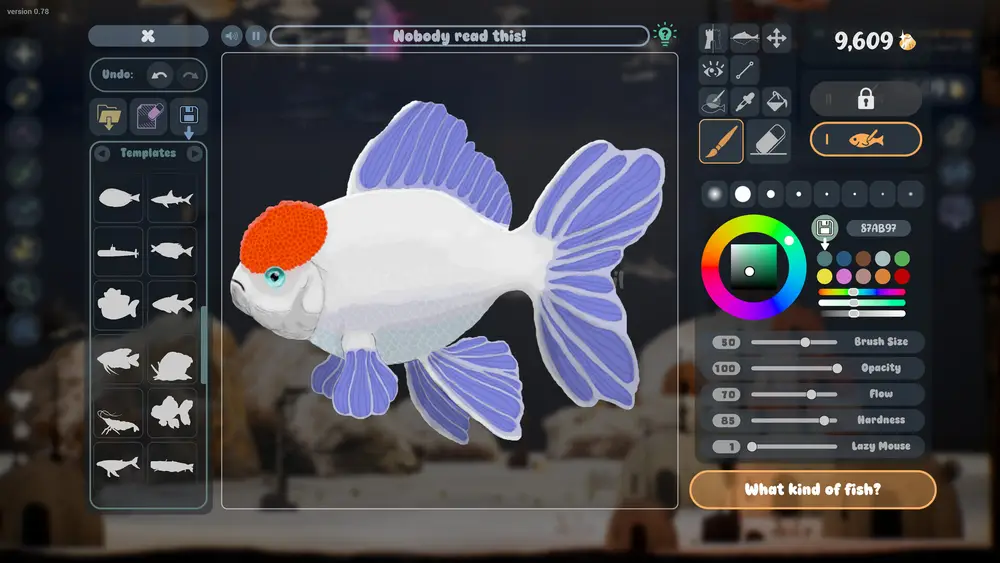
Drawing. The editor has templates, a canvas, brush controls, a fill tool, shapes, symmetry, eye and fin parts, and a hex color field. Fish can be renamed, saved, and edited again later. The demo page also lists custom templates and custom categories, so the template list is meant to grow with you rather than stay fixed.
Importing. The store page explicitly supports PNG imports, including a child's drawing. Imported art becomes part of the aquarium rather than a separate gallery.
Feeding and cleaning. Food is drawn in its own editor. Fish eat, leave leftovers, and bottom-feeding fish specialize in cleaning those leftovers. The aquarium vacuum handles the rest. The September update post says leftover food and debris now stay in the tank until you remove them, which makes cleaning a real chore rather than a cosmetic detail.
Growth and relationships. Fish have levels, ages in days, personal quotes, hunger, and relationship status. They can become friends, rivals, or partners, and breeding produces baby fish that grow. Well-kept fish develop a metallic shimmer, and the developer says a fish kept well enough can become a golden fish.
Golden Scales. This is the progression currency. You collect scales that appear in the tank and earn them from goals, then spend them on unlocks. A screenshot of the template popup shows an unlock price of 2 Golden Scales, so early prices are small. Larger tanks and decor are the long-term sinks.
Wallpaper mode. The tank becomes a live Windows desktop background. Desktop icons and the taskbar remain usable, the game moves to the system tray, and a tray menu offers Return to Game. The September update says the mode was overhauled for stability and audio switching.
Focus tools. A clock, a timer, a journal, and a checklist live inside the aquarium. They are part of the same screen as the fish, which is the point: the tank is meant to be open while you work.
What is not confirmed yet
The store page does not list a price, achievement support, Steam Deck verification, or a recommended GPU. The number of fish templates, decoration items, and tanks is not published. Community Gallery was being tested in October but is not confirmed as a launch feature. Treat any page that gives exact drop rates, tier stats, or a full item count as a guess until the developer publishes numbers.
Drawarium vs Drawquarium: the name confusion
Some searches use "Drawarium" or "Draw Aquarium". The Steam app is spelled Drawquarium (app 4045480), developed by byKaleb and published by rokaplay. "Draw Aquarium" is also the name of unrelated mobile apps, so check the developer name before you install anything. The official links are the Steam page, the rokaplay publisher page, the rokaplay Discord, and the accounts @drawquariumgame on X and Bluesky.
Wishlist the game on Steam before launch day. The October 31 post says the release trailer pulled 1.6M views on IGN and 65,000 wishlists in one week, so launch-day traffic will be high and the store page is the only place where price and download size will be authoritative.
Official source: Drawquarium on Steam ↗, rokaplay ↗ and the Drawquarium Discord ↗
Which page to read next
The wiki is organized by the job you are trying to finish, not by keyword. If you are brand new, read the beginner guide. If you are stuck on a specific screen, the how-to-play page walks through the interface. If you want to know what each fish type is for, the fish list and tier list answer different questions: the list is descriptive, the tier list is a judgment.
FAQ
Is Drawquarium a full game or a wallpaper app?
It is a game first. The store page sells drawing, raising, breeding, decorating, and unlocking. Wallpaper mode is one feature of that game, not a separate product.
Is there a free version?
Yes. Drawquarium Demo is a separate free app on Steam (app 4331760). It is not a time-limited trial of the full game as far as the store page says, but it is also not the release build; the September post lists twenty changes made after the May demo.
Does Drawquarium have multiplayer?
No multiplayer is listed on the store page. The Steam feature list includes single-player, Steam Cloud, and Family Sharing.
Where is the official community?
The publisher runs a Discord at discord.gg/rokaplay. The developer posts release news on Steam and on @drawquariumgame. This site is unofficial and does not speak for byKaleb or rokaplay.
More Drawquarium Guides
How levels, days old, medals, metallic shimmer, and golden fish work in Drawquarium, and what the level 25 goal actually asks for.
A Drawquarium fish list built from official screenshots and patch notes: body templates, bottom feeders, jellyfish, sharks, and golden fish.
Use Drawquarium as a focus companion: the clock, timer, journal, checklist, and wallpaper mode, plus a simple work session setup.
How the Drawquarium food editor works, which shapes to draw, how portion size affects leftovers, and why bottom feeders still need the vacuum.
A practical Drawquarium guide for the first hour: draw a fish that reads well, feed it, finish early goals, and unlock your first upgrades.
Where Drawquarium runs: Windows PC requirements, Mac and Linux answers, Steam Deck compatibility, mobile, and console availability.
Drawquarium's price has not been announced. What is confirmed, how regional pricing works, whether it is free, and how to avoid overpaying.
Drawquarium launches on November 13, 2026 for Windows on Steam. What is confirmed about the release, the trailer, wishlists, and launch day.