
Drawquarium Wallpaper Mode: Setup and Tips
How Drawquarium wallpaper mode works on Windows: enabling it, the tray menu, desktop interaction, audio, performance, and composition tips.
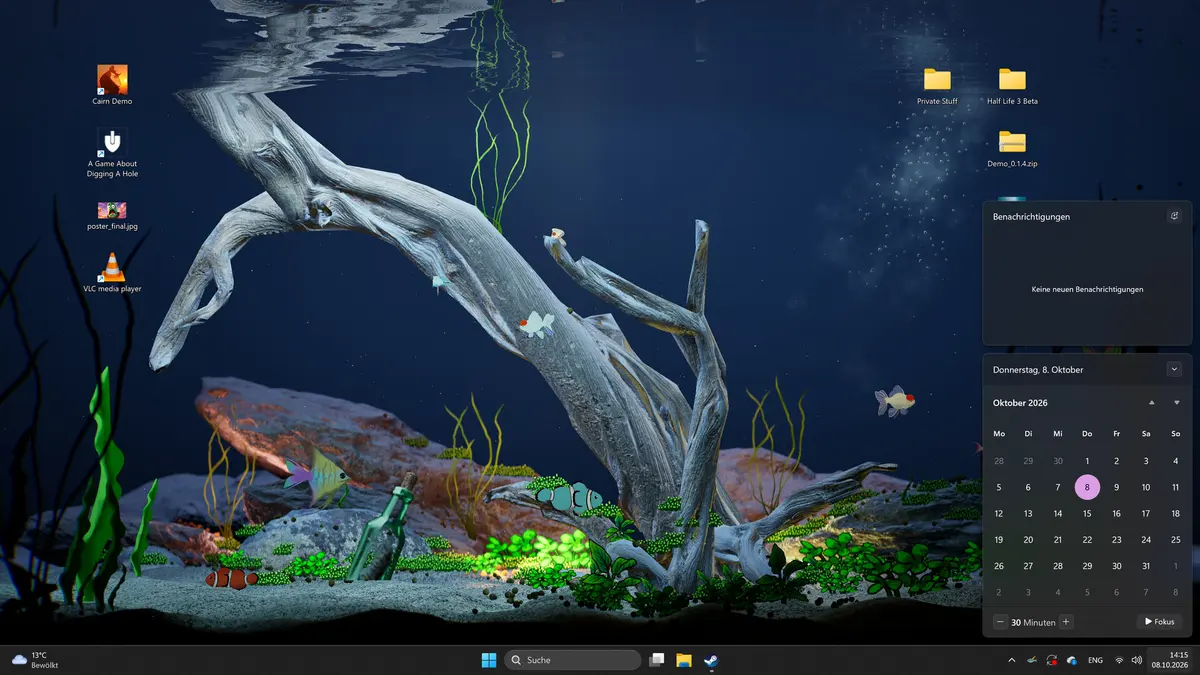
Wallpaper mode is the feature that separates Drawquarium from a normal aquarium game. Your tank becomes the Windows desktop background, complete with swimming fish, plants, and lighting, while your icons and taskbar keep working. The game minimizes to the system tray so it stays out of the way. This guide covers what the mode does, how to set it up, and how to make a tank that looks good at monitor scale.
A wallpaper tank needs a different composition; the decoration guide→ covers the layers.
What wallpaper mode is
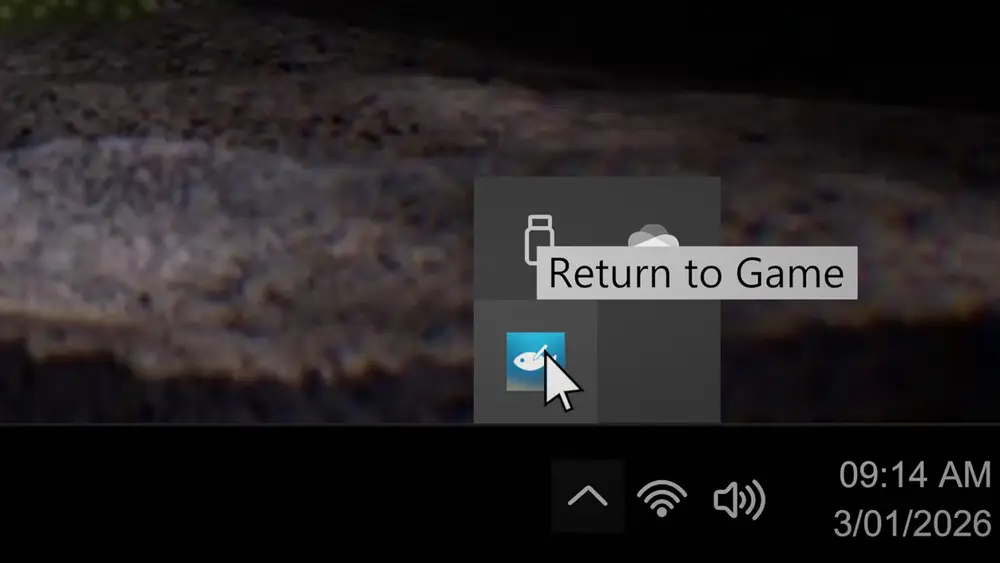
The store page describes it as a mode where you can watch, feed, and play with your fish directly on your desktop. The screenshots show a full Windows 11 desktop with the aquarium behind the icons and the taskbar. A tray icon appears while the mode is active, and its menu offers Return to Game.
It is not a separate app and it is not a video file. It is the game rendering your aquarium as a live background.
How to enable it
The tank screen has a wallpaper icon on the right side, next to the settings gear and the hide-interface eye. Clicking it should switch the game into wallpaper mode. The exact click path is visible in the official gallery, but the icon position may shift between builds.
Once active, the game window disappears and the tray icon appears. To get back, right-click the tray icon and choose Return to Game. The game does not quit when the window disappears.
What you can do from the desktop
The store page says you can watch, feed, and play with your fish in wallpaper mode. The fish still swim, plants still sway, and the tank still needs maintenance. The interface is hidden, so the mode is for light interaction rather than building.
If you need to draw, rearrange decor, or spend scales, return to the game window. Wallpaper mode is a viewing state.
Audio behavior
The September update says wallpaper mode was made more stable and that audio now behaves when switching modes. The game has music and ambient sound that can be mixed, according to the same update.
If audio keeps playing when you expect silence, check the game's audio settings before you switch modes. If audio cuts out, switch back to the game window, confirm the audio is on, and re-enter the mode.
Performance
The store page lists a GTX 1060 or RX 580 as the minimum GPU, with 6 GB of VRAM and DirectX 12. A live wallpaper is not free: it renders continuously while you work. On a laptop, expect battery drain and fan noise.
The September update mentions automatic quality detection. If the wallpaper stutters, let the game pick a quality level, or lower the tank's lighting and caustics. A dark tank with fewer particles is cheaper to render than a bright, busy one.
Composition for a desktop
A tank that looks good in the game window can look wrong as a wallpaper because the desktop crops and covers it. Compose for the monitor:
- Keep the focal point off-center. Icons tend to cluster on the left; put the main driftwood or rock on the right.
- Leave the middle open. Fish cross the center, and the center is where your eyes rest.
- Use a dark background. Icons and text are easier to read over deep blue than over a bright reef.
- Hide the HUD. The eye icon removes the interface so only the tank remains.
Test the tank at your actual resolution before you commit. A layout that works at 1920×1080 may lose its focal point at 2560×1440.
Wallpaper mode vs a video wallpaper
A video wallpaper loops a recording. Drawquarium renders the actual tank, so the fish move differently over time, plants respond to the water settings, and the scene changes as your aquarium changes. That is the appeal, and it is also why the mode costs more GPU than a video loop.
Is it a replacement for Wallpaper Engine?
No. Wallpaper Engine plays and manages wallpaper content; Drawquarium is a game that can display one tank as a background. If you already use Wallpaper Engine, check whether it conflicts with another wallpaper manager before you enable Drawquarium's mode.
Set up the tank, run it in wallpaper mode for an hour, and watch your normal work. If the motion distracts you, slow the water and reduce the particles before you give up on the mode.
Official source: Drawquarium store page ↗ and the September update ↗, rokaplay ↗ and the Drawquarium Discord ↗
FAQ
Does wallpaper mode work on Windows 10?
The game requires Windows 10 64-bit or newer, so the mode should work there. The official screenshots show Windows 11.
Can I use it on multiple monitors?
Multi-monitor behavior is not documented. The playtest notes mention ultrawide and unusual resolutions as test areas, which suggests multi-monitor is not a solved case yet.
Does the game need to stay open?
Yes. The game runs minimized to the tray while the wallpaper is active. Closing it stops the wallpaper.
Can I interact with fish from the desktop?
The store page says you can watch, feed, and play with them in wallpaper mode. The interface is hidden, so the interaction is limited compared with the game window.
More Drawquarium Guides
How levels, days old, medals, metallic shimmer, and golden fish work in Drawquarium, and what the level 25 goal actually asks for.
A Drawquarium fish list built from official screenshots and patch notes: body templates, bottom feeders, jellyfish, sharks, and golden fish.
Use Drawquarium as a focus companion: the clock, timer, journal, checklist, and wallpaper mode, plus a simple work session setup.
How the Drawquarium food editor works, which shapes to draw, how portion size affects leftovers, and why bottom feeders still need the vacuum.
A practical Drawquarium guide for the first hour: draw a fish that reads well, feed it, finish early goals, and unlock your first upgrades.
Where Drawquarium runs: Windows PC requirements, Mac and Linux answers, Steam Deck compatibility, mobile, and console availability.
Drawquarium's price has not been announced. What is confirmed, how regional pricing works, whether it is free, and how to avoid overpaying.
Drawquarium launches on November 13, 2026 for Windows on Steam. What is confirmed about the release, the trailer, wishlists, and launch day.